Migrating a Card Management System
Introduction
Definition of migration
We can define migration as transferring existing data from a system. For the purpose of this article let’s call the existing system OLD and the new system NEW.
Different methodologies
- ETL: Extract, Transform, Load. It’s a process used to move data from various sources into a central repository, cleaning and transforming it along the way to ensure consistency and usability for analysis and reporting.
- ELT (Extract, Load, Transform): Data is loaded into the target system first, and transformations are performed within the target system. This is becoming more popular with the rise of cloud data warehouses.
- Data Virtualisation: Provides a virtual layer that allows users to access data from multiple sources without physically moving the data.
- Change Data Capture (CDC): Captures changes to data in source systems in near real-time and replicates them to the target system.
For our card management system migration we will use the the ETL process.
ETL
Think of ETL as an assembly line for data. Raw materials (data from different sources) enter, they are processed and refined (transformed), and then assembled into a finished product (data in the target repository) that’s ready for use.
Here’s a more detailed look at each phase:
1. Extract Key activities:
- Identifying data sources: Figuring out where the data lives (databases, applications, files, APIs, etc.). Let’s assume that all data of OLD exists in a Postgres database (my favourite database these days!).
- Connecting to data sources: Establishing connections to these systems. This often involves authentication, authorisation, and understanding the data source’s API or protocol. For the purpose of these example, let’s assume that no connection is required and data is moved with CSV files.
- Selecting data: Determining which data to extract. This might involve filtering based on specific criteria (e.g., date ranges, specific product categories) or selecting only certain fields from tables. More about this later for our card management system.
Challenges:
- Data source availability: Sources may be unavailable at certain times, requiring robust error handling and retry mechanisms. Remember OLD is a system that handles real time authorisations and is live 24/07.
- Data volume: Extracting large volumes of data can be slow and resource-intensive.
2. Transform Key Activities:
- Handling missing values (e.g., replacing them with default values or removing records). An example with the OLD database is that it has Customers with missing address fields while the NEW database does not allow that.
- Removing duplicate records.
- Standardising data formats (e.g., date formats, currency symbols).
- Joining data from multiple sources to create a more complete view.
- Looking up values from reference tables (e.g., looking up a product category based on a product ID).
- Deriving new attributes (e.g., calculating age from a birthdate).
- Removing irrelevant or unwanted data.
- Data masking/anonymisation: Protecting sensitive data (e.g., redacting credit card numbers, names). It is very important to ensure that all sensitive data will be migrated in a secure way without any risks of exposing them.
Challenges:
- Data quality issues: Identifying and correcting errors in the data.
- Complex transformations: Implementing complex business rules and calculations.
- Data validation: Ensuring that the transformed data meets quality standards.
3. Load Key Activities:
- Loading data into tables: Inserting or updating data in the appropriate tables in the data warehouse or data lake.
- Handling errors: Implementing error handling mechanisms to deal with load failures.
- Optimising load performance: Using techniques like bulk loading to speed up the process.
- Maintaining data integrity: Ensuring that the data is loaded correctly and consistently.
- Auditing: Tracking the load process for monitoring and troubleshooting. More about this later.
Challenges:
- Target system performance: Loading large volumes of data can impact the performance of the target system.
- Data consistency: Ensuring that the data is consistent after the load.
- Data dependencies: Loading data in the correct order to satisfy dependencies between tables.
The Migration
Introduction
Our goal is to successfully move the data from the OLD system to the NEW system. In order to do that we will use a staging database, let’s call it LOADER. We extract and transform data from OLD to LOADER and then data is moved from LOADER to NEW. This is an iterative process with a validation feedback loop to ensure that data is clean as we will see later.
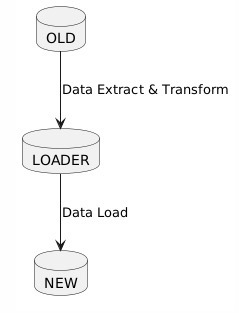
First let’s talk about the LOADER which is also called the staging database.
The Staging Database
This database is used as an intermediary step between OLD (source system) and the new system (NEW) in a migration or ETL process.
Here’s a breakdown of the advantages
1. Decoupling and Isolation:
- Reduces Impact on Source Systems: The loader DB acts as a buffer. Instead of directly hammering the source system with heavy queries and extractions, you extract data into the loader DB first. This minimises the performance impact on the live source system, especially crucial during peak hours. Extractions can be scheduled for off-peak times. Remember this is a live system with transactions coming in 24/07. We can schedule extractions not to be done during Saturday morning that everybody is shopping and using their cards.
- Shields the Target System During Transformations: Transformations can be complex and resource-intensive. Performing these operations within the loader DB isolates the target system from these processes. If transformations fail or cause issues, they don’t directly affect the target system’s stability or data integrity. The target system only receives clean, transformed data.
2. Data Quality and Validation:
- Dedicated Space for Cleaning: The loader DB provides a dedicated environment for data cleansing, validation, and transformation. You can run extensive data quality checks in the loader DB without affecting either the source or target systems.
- Error Handling and Correction: If you encounter errors during transformation, you can easily correct the data within the loader DB before loading it into the target system. This prevents bad data from polluting the new system.
- Auditing and Tracking: You can implement auditing mechanisms within the loader DB to track data lineage, transformation steps, and error handling. This is essential for data governance and regulatory compliance.
3. Transformation Flexibility and Performance:
- More Transformation Options: The loader DB can be chosen specifically to facilitate transformations. You might choose a DB technology that offers strong SQL capabilities, specialised data transformation functions, or better performance for specific types of transformations.
- Improved Transformation Performance: You can optimise the loader DB for transformation tasks. This might involve creating appropriate indexes, partitioning tables, or using specialised data transformation tools within the loader DB.
- Parallel Processing: You can often parallelise transformation processes within the loader DB to speed up the overall migration or integration.
4. Disaster Recovery and Rollback:
- Backup and Restore: The loader DB provides a backup copy of the extracted data. This can be useful for disaster recovery or for rolling back to a previous state if necessary.
However a staging database can have some disadvantages. Below are some things to Consider:
- Increased Complexity: Adding a loader DB introduces another component to the overall architecture, increasing the complexity of the system.
- Additional Resources: You need to provision and manage a separate database for the loader DB, which requires additional hardware, software, and administrative overhead.
- Increased Development Effort: You need to develop and maintain the ETL processes for moving data into the loader DB and then from the loader DB to the target system.
The OLD System
The OLD Diagram
This is an oversimplified ERD (entity relationship diagram) of our existing Card Management system.

Categorising Data
After mapping the OLD system, we need to categorise data for migration. “Required Data” is essential for the new system’s core functions, while “Excluded Data” is obsolete or unnecessary. “Sensitive Data” demands anonymisation for privacy, and “Historical Data” is archived separately for compliance or future analysis. This segmentation streamlines the migration, ensures compliance, and optimises resource allocation.
Data to be Migrated (Required Data):
- Definition: Data absolutely necessary for the NEW card management system to function correctly.
Examples
- Customers Table: Active customer records, including customer_id, first_name, last_name, date_of_birth, and (potentially) masked/anonymized address, city, state, post_code, phone_number, and email. Crucial: The linking customer_id is a must-have.
- CardProducts Table: All card product definitions, including product_id, product_name, interest_rate, credit_limit, and annual_fee.
- Cards Table: Active card records, including card_id, customer_id, product_id, card_number_hash, expiration_date, issue_date, card_status, and credit_limit. Important: Only card_number_hash (not the actual card numbers) should be migrated.
- Transactions Table: Recent transactions (e.g., the last 12 months) for active cards, including transaction_id, card_id, transaction_date, transaction_amount, transaction_type, merchant_name, merchant_category_code, transaction_status, and authorisation_code. The specific timeframe depends on reporting requirements.
2. Data Not to be Migrated (Excluded Data):
- Definition: Data that is not needed in the NEW card management system and should be excluded.
Examples:
- Old system audit logs: If a separate audit system is being implemented in the NEW system.
- Archived application code or configuration files specific to the OLD system.
- Data from tables or fields in the OLD system that are not represented in the NEW system’s data model and serve no business purpose.
- SSN field from the Customer table because its not recommended to store this data.
3. Data to be Anonymised/Pseudonymised (Sensitive Data):
- Definition: Data needed in the NEW system but requires protection.
Examples:
- Customers Table:
- address, city, state, post_code: Can be generalised (e.g., replace with a general geographic region) or completely anonymised if not essential for NEW system functionality.
- phone_number: Can be replaced with a generic number or partially masked.
- email: Can be hashed (one-way).
- Cards Table:
- card_number_hash: Should already be hashed in the OLD system. If not, it must be hashed before migration. Never migrate raw card numbers. The Hashing ALGORITHM must be determined to be suitable
- cvv_hash: Should not be migrated at all. It’s best practice not to store CVV values. If the OLD system does, ensure it’s not transferred. The algorithm is not up to par.
4. Data to be Archived (Historical Data):
- Definition: Data not actively used but retained for compliance/audit.
Examples:
- Transactions older than 12 months (or whatever retention period is defined by regulations/policy).
- Closed customer accounts (after a defined retention period).
- Complete history of card status changes (e.g., when a card was reported lost/stolen).
By applying these classifications specifically to the Card Management System data, you can create a more focused and effective data migration plan. This will help you to ensure that the NEW system has the data it needs to function correctly, while also protecting sensitive information and complying with all applicable regulations. Remember to consult with relevant stakeholders (business users, data owners, security experts) to validate these classifications and define appropriate handling strategies for each data type.
The Extract and Transform Process
We extract and transform data from OLD to LOADER. Then data is moved from LOADER to NEW.
This is an iterative process with a validation feedback loop to ensure that data is clean. Below are the validations that are done.
Extraction Validation (OLD -> LOADER):
A. Record Count Reconciliation:
- Action: Immediately after extraction from each table in the OLD system, count the number of records extracted. Store these counts in a metadata table within the LOADER DB.
- Validation: Compare these counts to the record counts in the corresponding tables in the OLD system. This detects data loss during the extraction process.
- Feedback: If the counts don’t match, flag the extraction process as failed. Investigate potential issues like network errors, incomplete extractions, or data source inconsistencies.
B. Basic Data Type and Format Validation:
- Action: Within the ETL process, as data is being loaded into the LOADER DB, perform basic data type and format checks. For example:
- Ensure that numeric fields contain valid numbers.
- Ensure that date fields contain valid dates in the expected format.
- Check that string fields don’t exceed their defined lengths.
- Validation: Use SQL constraints (e.g., CHECK constraints) on the LOADER DB tables to enforce these rules.
- Feedback: If validation fails, reject the invalid records and log the errors (record ID, field, error message) into an error table within the LOADER DB.
C. Data Sampling and Profiling:
- Action: Extract a random sample of records from the OLD system before the full extraction and store it separately. After the data is in the LOADER DB, extract a corresponding random sample and compare the data. Additionally, profile the data in the LOADER database (using SQL queries or dedicated data profiling tools) to identify:
- Min/Max values
- Null value percentages
- Unique value counts
- Data distribution patterns
- Validation: Compare the sample data and profile statistics to the OLD system.
- Feedback: Significant deviations in the samples or profiling results indicate potential data extraction or transformation issues. Investigate further.
II. Transformation Validation (LOADER internal):
A. Transformation Rule Validation:
- Action: For each transformation rule applied to the data in the LOADER DB, create validation rules to verify the transformation’s correctness. For example:
- If you’re converting a currency, check that the converted values are within an acceptable range based on the exchange rate.
- If you’re concatenating fields, verify that the concatenated field is populated correctly.
- If you’re calculating a new value, double-check the formula used.
- Validation: Implement these validation rules using SQL queries within the LOADER DB.
- Feedback: Log any records that fail these validation rules into an error table in the LOADER DB, along with the specific rule that was violated.
B. Referential Integrity Checks:
- Action: After transformations, verify that all foreign key relationships are valid. For example, ensure that all customer_id values in the Cards table exist in the Customers table in the LOADER DB.
- Validation: Use SQL queries (e.g., NOT EXISTS subqueries) to identify orphaned records.
- Feedback: Log any orphaned records into an error table.
C. Business Rule Validation:
- Action: Implement validation checks based on key business rules. For example:
- Check that the credit limit for a card is within the acceptable range for the card product.
- Check that the transaction amount is within a reasonable range for the merchant category code.
- Validation: Use SQL queries to enforce these business rules.
- Feedback: Log any violations into an error table.
III. Load Validation (LOADER -> NEW):
A. Record Count Reconciliation (Again!):
- Action: After loading data into the NEW system, count the number of records loaded into each table.
- Validation: Compare these counts to the record counts in the corresponding tables in the LOADER DB (after transformations). This validates that all data from LOADER reached the NEW system.
- Feedback: If the counts don’t match, flag the load process as failed and investigate.
B. Data Comparison (Critical for Data Accuracy):
- Action: Select a sample of records from the NEW system and compare them to the corresponding records in the LOADER DB. This is a crucial step to ensure that the data was loaded correctly and that no data corruption occurred during the load process. Focus on key fields.
- Validation: Use SQL queries to compare the data.
- Feedback: Log any discrepancies into an error table.
C. Functional Testing:
- Action: Run functional tests against the NEW system using the loaded data. This involves performing actions (e.g., creating new cards, processing transactions) and verifying that the system behaves as expected.
- Validation: Verify that the results of the functional tests are correct.
- Feedback: Report any functional issues to the development team.
D. Data Profiling (Again!):
- Action: Profile the data in the NEW database and compare the results with the data profiling performed in the LOADER DB.
- Validation: Large deviations in profiles can indicate issues with data loading or transformation.
- Feedback: Investigate and resolve discrepancies.
IV. Monitoring and Reporting:
A. Centralized Monitoring Dashboard:
- Action: Create a centralized monitoring dashboard to track the status of the ETL process and display key metrics, such as:
- Extraction start and end times
- Transformation start and end times
- Load start and end times
- Record counts for each table
- Number of errors detected at each stage
- Validation: Monitor the dashboard regularly to identify any potential issues.
- Feedback: Set up alerts to notify the ETL team of any critical errors or deviations from expected performance.
B. Error Reporting:
- Action: Generate regular reports that summarize the errors detected during the ETL process.
- Validation: Review the error reports to identify patterns and trends.
- Feedback: Use the error reports to improve the data quality and transformation rules.
V. Iterative Refinement:
A. Continuous Improvement:
- Action: Treat the validation feedback loop as an iterative process. Continuously review the validation rules, transformation rules, and monitoring dashboards to identify areas for improvement.
- Validation: Measure the effectiveness of the validation rules and identify any gaps.
- Feedback: Use the feedback to refine the ETL process and improve data quality.
Key Considerations:
- Error Tables: Design robust error tables in the LOADER DB to capture detailed information about each error. Include fields for record ID, field name, error message, timestamp, and the stage where the error occurred.
- Automation: Automate as much of the validation process as possible. Use scripting languages (e.g., Python) or ETL tools to create automated validation checks and error reporting.
- Data Stewards: Involve data stewards or subject matter experts in the validation process to review the data and identify any potential issues.
- Sampling: Use appropriate sampling techniques to ensure that the samples are representative of the overall data.
- Performance: Optimize the validation checks to minimize their impact on the ETL process performance.
Example SQL for Validation:
— Example: Record count validation
SELECT COUNT(*) FROM “OldSystem”.customers; — Count from OLD
SELECT COUNT(*) FROM “LoaderDB”.customers; — Count from LOADER
— Example: Referential integrity check
SELECT COUNT(*)
FROM “LoaderDB”.cards
WHERE customer_id NOT IN (SELECT customer_id FROM “LoaderDB”.customers);
— Example: Business rule validation
SELECT COUNT(*)
FROM “LoaderDB”.cards c
JOIN “LoaderDB”.cardproducts p ON c.product_id = p.product_id
WHERE c.credit_limit > p.credit_limit * 2; — Check credit limit not excessive
— Example: Data type/format validation
SELECT COUNT(*)
FROM “LoaderDB”.transactions
WHERE transaction_date !~ ‘^\d{4}-\d{2}-\d{2} \d{2}:\d{2}:\d{2}$’;
Below are Postgres SQL scripts that can be used for validation.
I. Extraction Validation (OLD -> LOADER):
— 1. Data Sampling (OLD System): Extract a random sample
— Option 1: TABLESAMPLE SYSTEM (Bernoulli sampling — may be the most efficient for large tables)
SELECT *
FROM “OldSystem”.customers TABLESAMPLE SYSTEM (10); — Approximate 10% sample
— Option 2: Generate a random number and filter (more portable, but potentially less efficient)
SELECT *
FROM “OldSystem”.customers
WHERE random() < 0.1; — Approximate 10% sample
— Option 3: Fetch Limited Sample by row number.
SELECT * FROM “OldSystem”.customers
WHERE (ctid % 10) = 0;
— Store results of this sample extraction separately (e.g., in a CSV file)
— 2. Data Profiling (LOADER DB)
— Example: Null Values in the Loader database
— Customers Table
SELECT
COUNT(*) AS TotalRecords,
SUM(CASE WHEN first_name IS NULL THEN 1 ELSE 0 END) AS NullFirstName,
SUM(CASE WHEN last_name IS NULL THEN 1 ELSE 0 END) AS NullLastName,
SUM(CASE WHEN date_of_birth IS NULL THEN 1 ELSE 0 END) AS NullDateOfBirth,
SUM(CASE WHEN address IS NULL THEN 1 ELSE 0 END) AS NullAddress,
SUM(CASE WHEN city IS NULL THEN 1 ELSE 0 END) AS NullCity,
SUM(CASE WHEN state IS NULL THEN 1 ELSE 0 END) AS NullState,
SUM(CASE WHEN post_code IS NULL THEN 1 ELSE 0 END) AS NullpostCode,
SUM(CASE WHEN phone_number IS NULL THEN 1 ELSE 0 END) AS NullPhoneNumber,
SUM(CASE WHEN email IS NULL THEN 1 ELSE 0 END) AS NullEmail,
SUM(CASE WHEN ssn IS NULL THEN 1 ELSE 0 END) AS NullSSN
FROM “LoaderDB”.customers;
— Examples: Minimum/Maximum values
SELECT MIN(transaction_amount), MAX(transaction_amount) FROM “LoaderDB”.transactions;
— Example: Unique value counts
SELECT COUNT(DISTINCT merchant_category_code) FROM “LoaderDB”.transactions;
II. Transformation Validation (LOADER internal):
A. Transformation Rule Validation:
— Example: Credit limit validation
SELECT c.card_id, c.credit_limit, p.credit_limit AS product_default_limit
FROM “LoaderDB”.cards c
JOIN “LoaderDB”.cardproducts p ON c.product_id = p.product_id
WHERE c.credit_limit > (p.credit_limit * 1.5); — Credit limit cannot exceed 150% of the default
III. Load Validation (LOADER -> NEW):
A. Record Count Reconciliation:
— Example: Compare Customers table (select a sample)
— Compare the first name, last name, etc between the records in loader and the new system.
SELECT l.customer_id, l.first_name AS loader_first_name, n.first_name AS new_first_name,
l.last_name AS loader_last_name, n.last_name AS new_last_name
FROM “LoaderDB”.customers l
JOIN “NewSystem”.customers n ON l.customer_id = n.customer_id
WHERE l.first_name <> n.first_name OR l.last_name <> n.last_name; — Find differences
C. Functional Testing: This step is less about direct SQL and more about executing specific application workflows and verifying the results. You might use SQL to set up test data or query the results after the test.
- Example: Create a new card in the NEW system through the application interface. Then, use SQL to verify that the card was created correctly and that the data is consistent.
— Verify the newly created card
SELECT card_id, customer_id, product_id, card_status
FROM “NewSystem”.cards
WHERE card_id = <the_card_id_you_just_created>;
. Basic Data Type and Format Validation:
sql
— Customers Table
— Example: Check for invalid date of birth
SELECT customer_id, date_of_birth
FROM LoaderDB.Customers
WHERE date_of_birth > CURRENT_DATE; — Date of birth cannot be in the future
— Example: Check for invalid post code format.
SELECT customer_id, post_code
FROM LoaderDB.Customers
WHERE post_code NOT LIKE ‘_____-____’; — Expect 5 digits hyphen 4 digits format. Check for format that you expect.
— Card Table
— Example: Check that card_status field is not empty
SELECT card_id, card_status
FROM LoaderDB.Cards
WHERE card_status IS NULL;
C. Data Sampling and Profiling:
— Example: Validate currency conversion (assuming you converted currency to USD)
— Assuming you have a table with original currency and converted USD amounts
— And a table with currency exchange rates.
— Example: validate currency
SELECT
t.transaction_id,
t.transaction_amount,
t.original_currency,
t.converted_amount_usd,
er.exchange_rate
FROM
LoaderDB.Transactions t
JOIN
LoaderDB.ExchangeRates er ON t.original_currency = er.currency_code
WHERE
ABS(t.converted_amount_usd — (t.transaction_amount * er.exchange_rate)) > 0.01; — Allow a small tolerance
B. Referential Integrity Checks:
sql
— Find orphaned Cards records (customer_id doesn’t exist in Customers table)
SELECT card_id, customer_id
FROM LoaderDB.Cards
WHERE customer_id NOT IN (SELECT customer_id FROM LoaderDB.Customers);
— Find orphaned Transactions records (card_id doesn’t exist in Cards table)
SELECT transaction_id, card_id
FROM LoaderDB.Transactions
WHERE card_id NOT IN (SELECT card_id FROM LoaderDB.Cards);
C. Business Rule Validation:
— 1. Get record counts from LOADER
SELECT ‘Customers’, COUNT(*) FROM LoaderDB.Customers UNION ALL
SELECT ‘CardProducts’, COUNT(*) FROM LoaderDB.CardProducts UNION ALL
SELECT ‘Cards’, COUNT(*) FROM LoaderDB.Cards UNION ALL
SELECT ‘Transactions’, COUNT(*) FROM LoaderDB.Transactions;
— 2. Get record counts from NEW
SELECT ‘Customers’, COUNT(*) FROM NewSystem.Customers UNION ALL
SELECT ‘CardProducts’, COUNT(*) FROM NewSystem.CardProducts UNION ALL
SELECT ‘Cards’, COUNT(*) FROM NewSystem.Cards UNION ALL
SELECT ‘Transactions’, COUNT(*) FROM NewSystem.Transactions;
— 3. Compare
— (You’d typically do this in a scripting language or ETL tool, not directly in SQL)
— Compare the results of the two queries above.
Data Comparison:
sql
— Example: Compare Customers table (select a sample)
— Compare the first name, last name, etc between the records in loader and the new system.
SELECT l.customer_id, l.first_name AS loader_first_name, n.first_name AS new_first_name,
l.last_name AS loader_last_name, n.last_name AS new_last_name
FROM LoaderDB.Customers l
JOIN NewSystem.Customers n ON l.customer_id = n.customer_id
WHERE l.first_name <> n.first_name OR l.last_name <> n.last_name; — Find differences
— Or generate hash SELECT l.customer_id, HASH(l.first_name + l.last_name) AS loader_hash, HASH(n.first_name + n.last_name) AS new_hash FROM LoaderDB.Customers l JOIN NewSystem.Customers n ON l.customer_id = n.customer_id WHERE HASH(l.first_name + l.last_name) <> HASH(n.first_name + n.last_name) ; — Find differences
— Different hash syntaxes — MD5(CONCAT(firstname, lastname)) — CHECKSUM(firstname, lastname) ```
C. Functional Testing: This step is less about direct SQL and more about executing specific application workflows and verifying the results. You might use SQL to set up test data or query the results after the test.
- Example: Create a new card in the NEW system through the application interface. Then, use SQL to verify that the card was created correctly and that the data is consistent.
- sql
— Verify the newly created card
SELECT card_id, customer_id, product_id, card_status
FROM NewSystem.Cards
WHERE card_id = <the_card_id_you_just_created>;
Important Notes:
- Adapt Data Types: The data types used in these scripts (e.g., VARCHAR, INT, DATETIME, DECIMAL) are generic. Adjust them to match the actual data types in your OLD, LOADER, and NEW systems.
- Error Handling: These scripts provide basic validation. In a real-world implementation, you’ll need to add robust error handling and logging to capture detailed information about any errors that occur. The INSERT INTO ErrorTable statements are placeholders for this. Create Error Table on the LOADER DB.
- Database-Specific Syntax: Some SQL syntax (e.g., NOW(), NEWID(), LIMIT) may vary depending on the database system you’re using. Refer to your database documentation for the correct syntax.
- Indexes: Ensure that your tables have appropriate indexes to optimize the performance of the validation queries.
- Security: Be extremely careful when accessing sensitive data (SSNs, card numbers, etc.) and follow all relevant security best practices.
- Transactions: Consider wrapping the validation steps into database transactions. This ensures that if one step fails, the entire validation process can be rolled back, maintaining data consistency.
Two-Way Adaptation
Migrating from a legacy system to a modern system demands more than just a forklift upgrade. Migration has to be a two-way adaptation process. At times, the ‘OLD’ system must evolve, reshaping its data or processes to meet the demands of the ‘NEW,’ ensuring seamless data ingestion and integration. Equally important, the ‘NEW’ system often needs to accommodate certain characteristics or dependencies of the ‘OLD,’ preserving critical workflows and historical data integrity. Below are two examples faced.
Scenario 1: OLD System Evolution (Adaptation for Compatibility)
- Problem: The OLD card management system stored customer addresses in a single, unstructured address field (e.g., “123 Main St, Anytown, CA 91234”). The NEW system requires customer addresses to be stored in a more structured format with separate fields for address, city, state, and post_code (as defined in the Customers table of our ERD).
- Required OLD System Evolution:
- Data Transformation Logic: Before extraction, the ETL process must include a data transformation step within the OLD system to parse the unstructured address field into its component parts (address, city, state, post_code). This might involve:
- Adding new, temporary columns to the Customers table in the OLD system.
- Writing SQL queries or stored procedures to populate these new columns by parsing the existing address field. This could involve using string manipulation functions (e.g., SUBSTRING, CHARINDEX or equivalent functions depending on the specific database).
- Updating the ETL extraction process to extract the data from these new columns.
- Dropping the new, temporary columns after successful extraction, if desired (though leaving them can be useful for auditing).
- Example SQL in OLD system for parsing (Illustrative — Adapt to your DB):
— First, add the new columns
ALTER TABLE Customers ADD COLUMN temp_address VARCHAR(255);
ALTER TABLE Customers ADD COLUMN temp_city VARCHAR(255);
ALTER TABLE Customers ADD COLUMN temp_state VARCHAR(255);
ALTER TABLE Customers ADD COLUMN temp_post_code VARCHAR(20);
— Update and parse the values. Be mindful of your specific city state post format
UPDATE Customers
SET
temp_address = SUBSTRING(address, 1, CHARINDEX(‘,’, address) — 1), — First Part until first comma.
temp_city = SUBSTRING(address, CHARINDEX(‘,’, address) + 2, CHARINDEX(‘,’, SUBSTRING(address, CHARINDEX(‘,’, address)+2, len(address) — CHARINDEX(‘,’, address)))- 1),
temp_state = SUBSTRING(address, LEN(address) — 6, 2),
temp_post_code = SUBSTRING(address, LEN(address) — 4, 5);
Scenario 2: NEW System Adaptation (Preserving Legacy Behavior)
- Problem: The OLD system allowed card IDs to be reused. This wasn’t enforced through a database constraint, but the application logic prevented two active cards from having the same ID. The NEW system enforces a unique constraint on the card_id column in the Cards table (as defined in our ERD). This causes issues during migration because some historical data in the OLD system includes inactive (e.g., closed or canceled) cards with duplicate card_id values.
- Required NEW System Adaptation:
- Data Transformation During Load (within LOADER or NEW system): The ETL process must adapt to handle the duplicate card_id values. Possible solutions include:
- Prefixing/Suffixing card_id: Add a prefix or suffix to the card_id in the NEW system to make them unique (e.g., adding a prefix based on the card’s issue date or a sequential number). This maintains the original card_id information while satisfying the uniqueness constraint.
- Hashing: Generate a unique hash value based on the original card_id and other card attributes. Use the hash as the new card_id in the NEW system. (This is a more complex solution).
- Creating a new Key Map: Create a Key map table that maps OLD card Ids to NEW card Ids.
- Application Logic Adaptation (in NEW system): The application logic in the NEW system needs to be updated to:
- Use the modified card_id values when retrieving card information.
- Handle searches based on the original card_id values (e.g., by querying a mapping table that stores the original and modified card_id values).
- Potentially display both the original and modified card_id values in the user interface.
The Loading
How to do Loading
There are two options for loading.
Option 1: Wait for the load to finish and start checking it. However, if there is corrupted data, we will need to rollback.
Option 2: Segment load to partitions and do the same process for each partition. If one fails, redo it.
Validations
- Fatal: breaks the load
- Warning: A Customer with an address were line 2 is populated but not line 1.
It’s usually better to fix all warnings or discuss those that are acceptable.
Below are some sql scripts that can be used during validation.
— Create the Migration_Check table (if it doesn’t exist)
CREATE TABLE Migration_Check (
check_id INT IDENTITY(1,1) PRIMARY KEY, — Autoincrement ID for each check
check_timestamp DATETIME DEFAULT GETDATE(), — Timestamp of the check
table_name VARCHAR(255), — Table being validated
record_id BIGINT, — ID of the record being validated (e.g., customer_id, card_id)
check_name VARCHAR(255), — Name of the validation check performed
status VARCHAR(20), — ‘Pass’ or ‘Fail’
error_message VARCHAR(255), — Error message (if any)
— Add indexes based on queries performed.
);
Stored Procedure 1: ValidateCustomerData
— Stored Procedure: ValidateCustomerData
— Description: Validates basic data integrity for a specific customer record and stores the results in Migration_Check.
— Parameters:
— @CustomerID INT: The ID of the customer to validate.
ALTER PROCEDURE ValidateCustomerData (
@CustomerID INT
)
AS
BEGIN
— Check if the customer exists
IF NOT EXISTS (SELECT 1 FROM Customers WHERE customer_id = @CustomerID)
BEGIN
INSERT INTO Migration_Check (table_name, record_id, check_name, status, error_message)
VALUES (‘Customers’, @CustomerID, ‘Customer Exists’, ‘Fail’, ‘Customer ID does not exist.’);
RETURN
END
ELSE
BEGIN
INSERT INTO Migration_Check (table_name, record_id, check_name, status, error_message)
VALUES (‘Customers’, @CustomerID, ‘Customer Exists’, ‘Pass’, NULL);
END
— Check if the first name is empty
IF (SELECT first_name FROM Customers WHERE customer_id = @CustomerID) IS NULL OR (SELECT first_name FROM Customers WHERE customer_id = @CustomerID) = ‘’
BEGIN
INSERT INTO Migration_Check (table_name, record_id, check_name, status, error_message)
VALUES (‘Customers’, @CustomerID, ‘First Name Not Empty’, ‘Fail’, ‘First name cannot be empty.’);
RETURN
END
ELSE
BEGIN
INSERT INTO Migration_Check (table_name, record_id, check_name, status, error_message)
VALUES (‘Customers’, @CustomerID, ‘First Name Not Empty’, ‘Pass’, NULL);
END
— Check if the last name is empty
IF (SELECT last_name FROM Customers WHERE customer_id = @CustomerID) IS NULL OR (SELECT last_name FROM Customers WHERE customer_id = @CustomerID) = ‘’
BEGIN
INSERT INTO Migration_Check (table_name, record_id, check_name, status, error_message)
VALUES (‘Customers’, @CustomerID, ‘Last Name Not Empty’, ‘Fail’, ‘Last name cannot be empty.’);
RETURN
END
ELSE
BEGIN
INSERT INTO Migration_Check (table_name, record_id, check_name, status, error_message)
VALUES (‘Customers’, @CustomerID, ‘Last Name Not Empty’, ‘Pass’, NULL);
END
— Check if the date of birth is in the future
IF (SELECT date_of_birth FROM Customers WHERE customer_id = @CustomerID) > GETDATE()
BEGIN
INSERT INTO Migration_Check (table_name, record_id, check_name, status, error_message)
VALUES (‘Customers’, @CustomerID, ‘Date of Birth in Future’, ‘Fail’, ‘Date of birth cannot be in the future.’);
RETURN
END
ELSE
BEGIN
INSERT INTO Migration_Check (table_name, record_id, check_name, status, error_message)
VALUES (‘Customers’, @CustomerID, ‘Date of Birth in Future’, ‘Pass’, NULL);
END
— If all checks pass, return success (or insert a general pass record)
END;
GO
— Example Usage:
— EXEC ValidateCustomerData @CustomerID = 123;
In a real project, the Migration_Check table will contain many different validations and it’s the analyst responsibility to understand which validations are applicable based on the scope/specifications.
Suggested validations for a card management system
I. Core Data Integrity & Quality Validations:
- Completeness:
- Ensure that all mandatory fields are populated for each entity (Customers, Cards, Transactions, CardProducts).
- Verify that no records are missing based on expected counts from source systems (Record Count Reconciliation).
- Data Type and Format:
- Validate data types for all fields (e.g., numeric fields are actually numbers, date fields are valid dates).
- Check that data formats adhere to expected patterns (e.g., post codes, phone numbers, email addresses).
- Verify that ENUM fields have valid values.
- Range Checks:
- Ensure that numeric values fall within acceptable ranges (e.g., interest rates, credit limits, transaction amounts).
- Validate date ranges (e.g., card expiration dates are not in the past, card issue dates are not in the future).
- Uniqueness:
- Enforce uniqueness constraints on key fields (e.g., customer_id, hashed card number). This often reveals data duplication or inconsistencies.
- Referential Integrity:
- Verify that all foreign key relationships are valid (e.g., customer_id in the Cards table exists in the Customers table, product_id in the Cards table exists in the CardProducts table).
- Identify and handle orphaned records (records with invalid foreign keys).
- Data Consistency:
- Check for consistency between related fields (e.g., if card_status is “Lost” or “Stolen,” ensure that all recent transactions have been flagged as potentially fraudulent).
- Validate that the credit_limit on the Cards table is consistent with the default credit_limit for the associated CardProducts.
- Data Accuracy (Sampling & Comparison):
- Select random samples of records and manually verify their accuracy against source data or original documents. This is a critical check for transformation correctness.
- Compare statistical summaries of key fields between the OLD and NEW systems (e.g., average transaction amount, distribution of card statuses).
- Data Security and Privacy:
- Verify that sensitive data (e.g., card numbers, SSNs) is properly masked, hashed, or tokenized according to security policies and regulations.
- Ensure that no raw card numbers are stored in the NEW system.
- Verify that access controls are in place to protect sensitive data.
- Confirm all sensitive data transfers are encrypted.
II. Business Rule Validations:
- Card Product Rules:
- Verify that the interest rate for a card is within the allowed range for the card product.
- Ensure that the annual fee for a card is consistent with the card product’s terms.
- Credit Limit Rules:
- Validate that the individual credit_limit on a card does not exceed a maximum percentage of the base product credit_limit.
- Check that the total credit limit assigned to a customer across all their cards does not exceed a certain threshold based on their credit score or other factors.
- Transaction Rules:
- Verify that transaction amounts are within acceptable ranges for the merchant category code (MCC). This helps detect potentially fraudulent transactions.
- Ensure that high-value transactions are subject to additional authorization checks.
- Validate that transactions are not processed on cards with a “Lost” or “Stolen” status.
- Card Status Rules:
- Ensure that cards are automatically suspended after a certain number of consecutive failed transaction attempts.
- Validate that closed card accounts are properly flagged and transactions are rejected.
- Fraud Detection Rules:
- Implement validations based on known fraud patterns (e.g., multiple transactions from different locations in a short period).
- Check for unusual transaction activity (e.g., a sudden spike in transaction volume).
- Validate that transactions are flagged for review if they exceed a certain risk score.
- Compliance Checks: * Validate data retention policies are set in place. * Validate that necessary data has been obtained and is available.
III. Advanced Validation Techniques:
- Data Profiling:
- Use data profiling tools to identify anomalies, inconsistencies, and unexpected values in the data.
- Compare data profiles between the OLD and NEW systems to detect potential data quality issues or transformation errors.
- Statistical Analysis:
- Perform statistical analysis on key fields to identify outliers, trends, and patterns.
- Use statistical models to predict expected values and flag records that deviate significantly from the predictions.
- Anomaly Detection:
- Implement anomaly detection algorithms to automatically identify unusual or suspicious records based on their characteristics.
- Flag records for manual review if they are identified as anomalies.
- Automated Testing:
- Create automated test scripts to validate that the NEW system is functioning correctly and that the data is accurate.
- Run these tests regularly as part of the ongoing maintenance and monitoring process.
IV. Process and Governance Considerations:
- Define Clear Validation Criteria:
- Establish clear and measurable validation criteria for each data element and business rule.
- Document these criteria in a validation plan.
- Assign Data Owners:
- Identify data owners who are responsible for ensuring the accuracy and quality of their data.
- Involve data owners in the validation process.
- Establish a Validation Workflow:
- Define a clear workflow for data validation, including roles, responsibilities, and escalation procedures.
- Implement a Data Quality Monitoring Dashboard:
- Create a dashboard to track data quality metrics and identify potential issues.
- Set up alerts to notify data owners and IT staff of any critical errors.
- Data Stewardship and Training:
- Implement a data stewardship program to ensure ongoing data quality management.
- Provide training to users on data quality standards and best practices.
- Regular Review and Improvement:
- Regularly review the validation process and identify areas for improvement.
- Update validation rules and procedures as needed to reflect changes in business requirements or data sources.
Reconciliation of Load
Reconciliation of the data load is paramount in a card management system migration, ensuring that the data transferred from the OLD system to the NEW is complete, accurate, and consistent. This involves meticulously comparing record counts between source and target systems, validating key data elements through sampling and automated checks, and confirming the integrity of relationships and business rules. Effective reconciliation minimizes the risk of data loss or corruption, providing confidence in the reliability of the NEW system and safeguarding critical business functions.
Types of reconciliation with some examples
Card Reconciliation:
- Ensuring total outstanding balances match.
- Reconciling individual card credit limits.
- Verifying total available credit across all cards.
- Card statuses:
- Matching counts of active, inactive, lost, stolen, and closed cards.
- Verifying status changes (e.g., a card closed in OLD is closed in NEW).
Transaction Reconciliation:
- Verifying total transaction counts align.
- Matching counts of debit vs. credit transactions.
- Reconciling transaction amounts by MCC (Merchant Category Code).
- Transaction statuses:
- Ensuring counts of approved, declined, and pending transactions match.
- Verifying reversals and refunds are properly reflected.
Interest Accrual Reconciliation:
- Confirming interest calculations are consistent.
- Matching total interest charged to customer accounts.
- Verifying the application of interest rates per card product.
- Confirming the accuracy of daily interest accrual calculations.
Customer Reconciliation:
- Ensuring the total number of active customers match.
- Verifying all customer reward points match.
- Reconciling customer demographic data (e.g. number of customers per state).
- Ensuring account linkages are maintained correctly (e.g., joint accounts).
- Data Fix: This involves directly correcting erroneous data within the LOADER database before it reaches the NEW system. For instance, if the OLD system allowed dates of birth in an invalid format (e.g., “MM/DD/YY”), a data fix would involve transforming these dates to the correct format (“YYYY-MM-DD”) in the LOADER before loading into the NEW system’s Customers table. Another example is correcting any inconsistencies with card statuses. Another Example would be to apply the Anonymization on the emails. Another example would be to implement credit ratings with a valid amount. Data fixes aim to remedy individual data errors, ensuring accuracy and consistency.
- Rules Change: This addresses issues stemming from discrepancies in business rules or data validation logic between the OLD and NEW systems. Imagine the OLD system didn’t enforce a maximum transaction limit per card product, but the NEW system does. Instead of manually fixing individual transactions, a rule change would involve modifying the transformation logic in the ETL process to automatically adjust transaction amounts (e.g., splitting a large transaction into smaller ones or flagging it for manual review) to comply with the NEW system’s stricter validation rules. This may even encompass a more lenient business rule on the NEW System to allow certain transfers from the OLD System that would otherwise be impossible. Another rule change would be to implement data generalization for invalid data. Another rule change could be the assignment of different account officers.
- Code Fix: This tackles problems originating from errors or limitations in the ETL code itself or within the NEW System application. Suppose the ETL process incorrectly maps the merchant_category_code values from the OLD to the NEW system, resulting in miscategorized transactions. A code fix would entail modifying the ETL code to ensure the correct mapping is applied, preventing further data misclassification. Alternatively, If the card id is the same between systems the system itself must be modified. Also, an implementation of a data pipeline would be a code fix.
Other Topics to Consider
Scope Definition & Management
Scope Definition & Management is essential to a successful card management system migration. This begins by precisely outlining what data, features, and integrations will be transitioned to the NEW system: Will all historical transactions be migrated, or only those within the last two years? Are we migrating the rewards program module, or deferring that to a later phase? Conversely, it’s equally important to explicitly define what’s out of scope, such as decommissioning a legacy reporting tool not integrated with the NEW system. A well-defined scope, coupled with a robust change management process, allows for controlled adjustments as the project progresses, preventing scope creep and ensuring that resources remain focused on delivering the core migration objectives within budget and timeline.
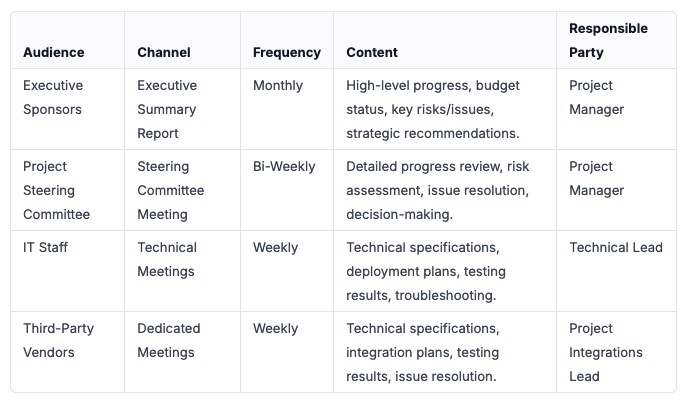
Communication Plan
It’s important to establish a communication plan to keep stakeholders informed of the project’s progress and any potential issues.
Example
Post-Migration Activities
- System Monitoring: Following the card management system migration, rigorous system monitoring is essential. This involves continuously tracking key performance indicators (KPIs) such as transaction processing times, system response times, and database resource utilization. By setting up alerts that trigger when thresholds are breached — for example, if transaction processing time exceeds a pre-defined limit or database storage capacity reaches 80% — IT staff can proactively identify and resolve performance bottlenecks, ensuring optimal system performance and preventing service disruptions for cardholders.
- User Training: Effective user training is crucial for maximizing the benefits of the NEW card management system. Post-migration, comprehensive training sessions should be conducted for all relevant staff, including card servicing representatives, fraud analysts, and customer support agents. Training should cover the NEW system’s functionalities, workflows, and reporting capabilities, empowering users to efficiently manage cardholder accounts, detect fraudulent activity, and provide excellent customer service. Supplemental training materials, such as user manuals and FAQs, should be readily available to reinforce learning and address ongoing questions.
- Performance Tuning: Post-migration performance tuning ensures the NEW card management system operates at peak efficiency. This involves analyzing query execution plans to optimize database queries, adjusting application code to reduce resource consumption, and fine-tuning infrastructure configurations to maximize throughput. For instance, if reports are running slowly, database indexes might be added or modified to improve query performance. If the system is experiencing high CPU utilization, application code might be refactored to reduce processing overhead. Ongoing performance tuning is essential for maintaining a responsive and scalable card management system.
- Decommissioning the OLD System: A well-planned decommissioning process for the OLD card management system is vital to avoid unnecessary costs and potential security risks. After verifying that all data has been successfully migrated and the NEW system is functioning correctly, the OLD system should be carefully shut down. This includes properly archiving or deleting sensitive data according to data retention policies and securely wiping any hardware or storage devices to prevent unauthorized access. A thorough decommissioning process minimizes the attack surface and ensures compliance with data security regulations.
- Data Validation (Ongoing): Sustaining data quality in the NEW card management system requires a commitment to ongoing data validation. This involves regularly running automated data quality checks, such as verifying the completeness and accuracy of customer records and validating that business rules are consistently enforced. By establishing a schedule for data validation and promptly addressing any identified issues, the organization can maintain the integrity of its data, ensuring accurate reporting, effective decision-making, and compliance with regulatory requirements. This process also allows for the refinement of validation processes and rules as the NEW system evolves.
In conclusion, a successful migration to a new card management system goes beyond a simple data transfer; it demands meticulous planning, robust data governance, and a commitment to continuous improvement. By carefully defining the project scope, implementing rigorous validation procedures, and prioritizing ongoing system monitoring and user training, organizations can minimize risk, protect sensitive data, and unlock the full potential of their new platform. The key lies in recognizing that migration is not a singular event, but rather a carefully orchestrated symphony of interdependent activities, culminating in a secure, efficient, and scalable card management system that empowers the business to thrive.
Last notes:
- The above article is based in my personal experience migrating several card management systems
- It was enhanced using Google Gemini.
- For my AI activities I use Librechat which I highly recomment.